Dubai parking SMS: number, format and payment steps for 2026
Dubai parking SMS payments need your plate, zone and duration. Find the correct format, confirmation steps and checks before you send.
- 8 min read
Dubai parking SMS payments go to 7275 using plate number <space> zone code <space> duration in hours, as of November 2026, according to the Roads and Transport Authority (RTA). Enter your bay’s zone, choose your duration, and wait for successful confirmation before treating your parking as paid.
Key facts
- As of November 2026, Parkin Company P.J.S.C.’s SMS instructions give A00000 000A 2 as an illustrative message for two hours and allow extension replies of Y or ن while the ticket remains valid.
- As of November 2026, Parkin’s payment guidance lists an SMS service fee of AED 0.30, separate from the parking tariff.
- As of November 2026, Parkin’s operating guidance lists ordinary public-parking hours as Monday–Saturday, 08:00–22:00, with Sundays generally free and multi-storey car parks chargeable 24/7.
How do you send a Dubai parking SMS?
To pay Dubai parking by SMS, enter your plate details, the exact zone code and your intended duration. Then send the message and check the successful confirmation.
- Park in an eligible public parking space.
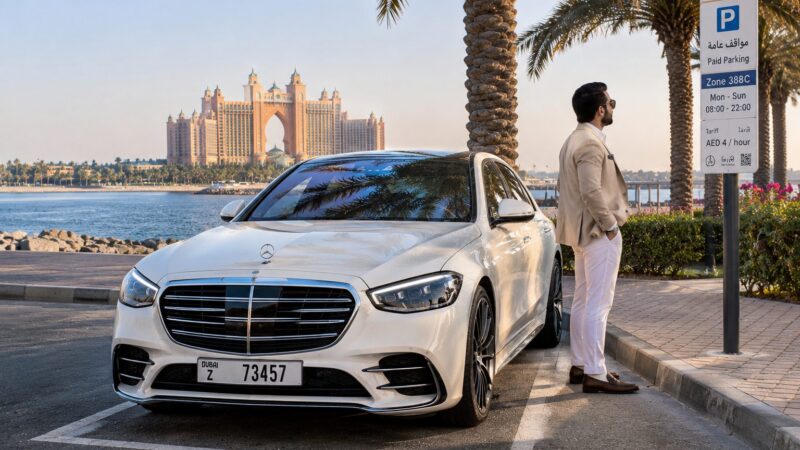
- Read the sign beside the bay for its zone, tariff and payment conditions.
- Enter your plate details in the message.
- Add a space, the zone code, another space and your duration in hours.
- Send the message to the Dubai parking SMS number.
- Wait for the confirmation message.
- Check the confirmed plate, zone and expiry before leaving.
The worked example in the key facts uses an illustrative plate and zone. Replace both with your own details rather than copying the example unchanged.
Also, match the plate details carefully, including the applicable plate code. A correctly spaced message can still describe the wrong vehicle if you mistype its registration.
How do you find the Dubai parking zone code?
Find the zone code on the parking sign serving the space where you have parked. Do not choose a code simply because it belongs to the same neighbourhood.
Nearby streets and parking areas can have different conditions. Therefore, check the sign after you park, rather than relying on a saved message from an earlier visit.
The sign next to the bay is the final word. Rules change, so resolve any difference between an older guide and current operator information before paying.
For example, a destination name does not identify the correct payment zone. Likewise, a public street space and a nearby private car park should not be treated as the same parking facility.
How much does it cost to pay for Dubai parking by SMS?
Your total includes the applicable parking tariff and a separate SMS service charge. Dubai does not have a single hourly price that applies to every public parking space.
The parking tariff depends on the location, category, duration and applicable peak or event conditions. Consequently, check the current fee for your actual zone rather than using a citywide estimate.
Also, check whether a displayed amount includes VAT before comparing it with an older tariff. An old screenshot may not represent the current payable total.
Which payment method should you choose?
| Payment method | What you do | What to check |
|---|---|---|
| SMS | Send the plate, zone and duration | Separate SMS charge and successful ticket confirmation |
| RTA Dubai app or Parkin app | Follow the official app’s parking-payment process | Correct vehicle, zone, duration and payment result |
| RTA Mahboub on WhatsApp | Follow the chatbot’s parking-payment instructions | Correct parking details and successful confirmation |
| Parking kiosk with nol | Follow the kiosk’s available payment instructions | The kiosk serves your parking area and confirms payment |
Choose a method that lets you verify the transaction. However, switching channels does not remove the need to select the correct vehicle and parking location.
How can you tell whether your parking SMS worked?
A sent message alone is not proof of paid parking. Wait for the successful confirmation and check the electronic ticket details.
In particular, compare the plate and zone with your vehicle and bay. Then check the expiry so you know when the paid session ends.
If the reply reports an error, follow its instructions rather than assuming payment succeeded. Similarly, a missing reply leaves the transaction unconfirmed.
- Check whether the reply confirms success or reports a problem.
- Review the plate details, zone and requested duration.
- Follow any correction instructions in the reply.
- Use another official payment channel if you cannot obtain confirmation.
- Check the successful ticket before walking away.
Also, keep the confirmation available while you are parked. It gives you the transaction details you need if you must check the session.
How do you extend a Dubai parking ticket by SMS?
Follow the extension instructions in Parkin’s reminder while your ticket is still valid. Do not assume that requesting more time automatically confirms an extension.
First, check that the reminder belongs to the vehicle and parking session you want to extend. Then send the instructed reply and wait for a successful extension confirmation.
Finally, check the new expiry. If the extension fails, use another available official payment channel rather than relying on an unconfirmed request.
If you have moved your car, check the new bay’s zone before paying again. Extending the previous session does not establish that you have paid for a different location.
When is Dubai public parking free?
Free parking depends on the facility and the applicable schedule. Do not assume that every Dubai parking space follows the ordinary public-street timetable.
Although the standard schedule includes a weekly free day, multi-storey facilities follow different charging arrangements. Event-related areas and other specially managed locations can also have different conditions.
During Ramadan or an announced holiday, check the operator’s current notice before deciding that payment is unnecessary. In particular, do not treat a weekend visit as proof that the bay is free.
Can visitors pay for Dubai parking without the RTA app?
You do not need the RTA Dubai app to use the SMS payment channel. However, visitors should check whether their plate and mobile service are accepted before relying on SMS.
A non-Dubai plate may require different plate identification. Therefore, do not force an unfamiliar registration into a Dubai-plate example or assume that every GCC plate follows identical instructions.
If you cannot establish the correct message or receive confirmation, choose an available official alternative. The payment method matters less than having a valid ticket for the correct vehicle and bay.
Where does UAE Parking help?
UAE Parking helps you build the exact parking SMS instead of typing the format from memory. Its Dubai parking SMS tool builds the message in your browser and lists zone rates and operating hours.
The free iPhone and Android app also lets you save plates on your device and select one when parking. However, you still need to choose the correct zone and check the operator’s confirmation.
UAE Parking is independent and is not affiliated with RTA or Parkin. It does not take or process payments; the parking operator charges your mobile account when you send the SMS.
Frequently asked questions
Should I copy the example plate and zone into my message?
No. Replace the illustrative plate and zone with your vehicle’s details and the code on the sign serving your bay.
Is a sent SMS enough to prove I paid?
No. Wait for a successful confirmation, then check the plate, zone and expiry on the electronic ticket.
Can I use a zone code from a nearby street?
Use only the code serving your actual parking space. Nearby streets or facilities can have different zones and payment conditions.
Does UAE Parking collect the parking payment?
No. UAE Parking builds the SMS, while the parking operator charges your mobile account when you send it.
Bottom line
Use the correct plate, read the zone at your bay and wait for successful confirmation. For help preparing the message, download the free UAE Parking app for iPhone or Android, then verify the ticket with the operator.