UAE SMS Parking Guide – Format Patterns, Confirmation & Troubleshooting (2026)
A general guide to SMS parking patterns across the UAE, typical reply times, retry logic if you don't get a response, and why telecom balance matters. Includes troubleshooting steps for formatting and delivery issues.
- 7 min read
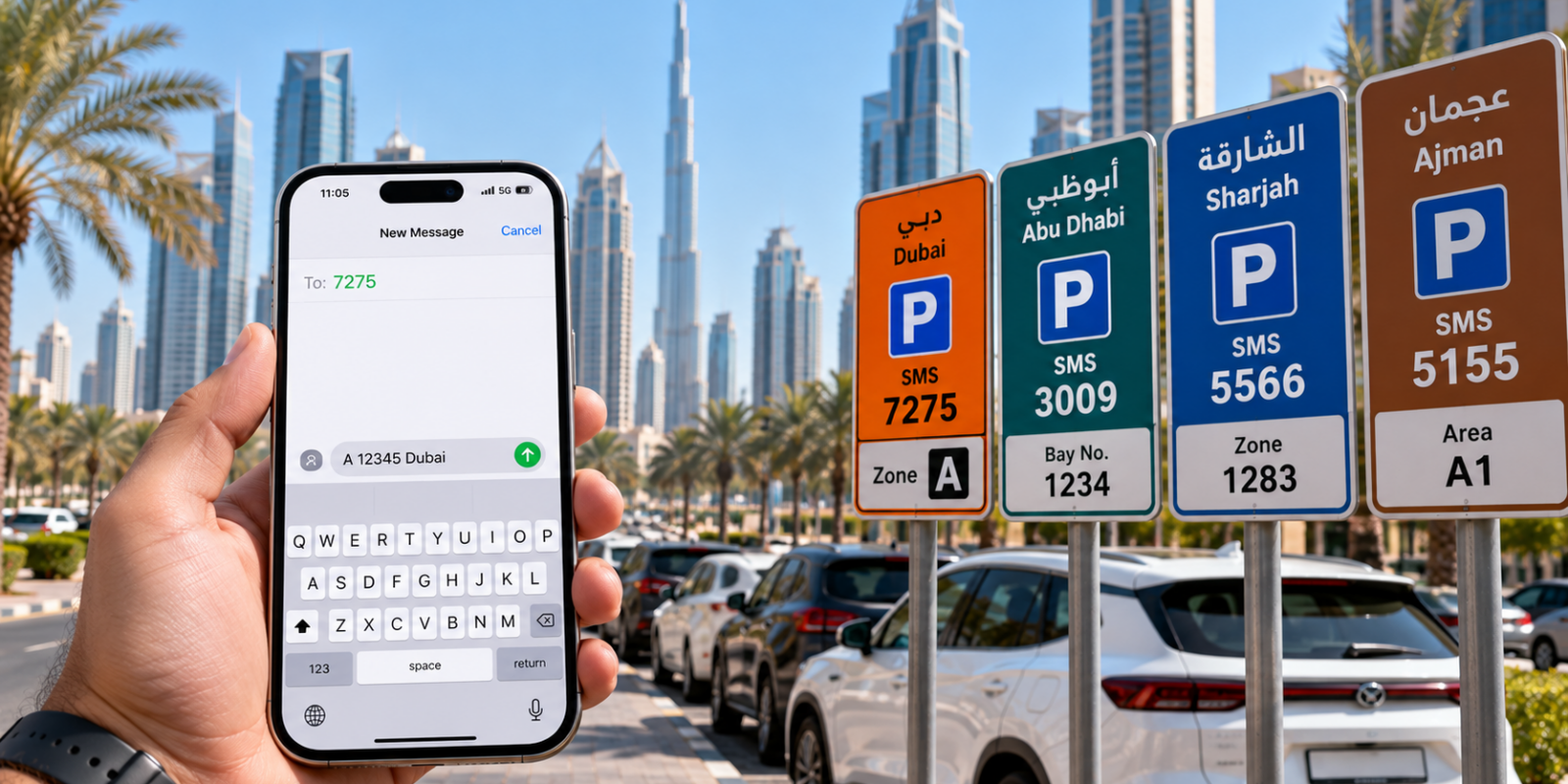
UAE SMS parking is the most widely used method for paying for street parking across the UAE. Each emirate has its own SMS number, format, and pricing structure. Whether you are in Dubai (7275), Abu Dhabi (3009), Sharjah (5566), or Ajman (5155), understanding the correct SMS pattern is essential to avoid failed payments and fines. This guide covers all SMS parking formats, troubleshooting tips, and best practices for 2026.
UAE SMS Parking Format Patterns by Emirate
SMS parking across the UAE generally follows a pattern: include your plate details, the posted zone code, and the duration you need. Some emirates require separators or keywords, while others accept a compact format. Destination numbers are printed on the sign and can differ across cities.
Dubai sends to 7275 with the zone letter + plate details. Abu Dhabi sends to 3009 with the bay number + plate details. Sharjah sends to 5566 with the zone code + plate details. Ajman sends to 5155 with the plate details only. Each pattern requires specific spacing and ordering. Sending the wrong format will result in a failed payment or no confirmation SMS.
Parking SMS Confirmation & What to Expect
After sending, you should receive a confirmation with the session’s start time and expiry. In busy periods it can take longer than a few seconds; give it a minute before resending. If you do not receive a reply, check your signal and balance, confirm that premium SMS is enabled on your plan.
The confirmation SMS is your proof of payment and should be saved until after you leave the parking area. It typically includes: the zone or bay number, your plate number, the session start time, the session duration, the total charge, and an expiry time. If you do not receive a confirmation within 2 minutes, your payment likely failed. Check your phone signal strength, SMS balance, and the format of your message before trying again.
Troubleshooting SMS Parking Failures
Small typos—especially around zone codes—are the most common cause of failures. Verify you used the right destination number and format. If you switch SIMs or operators, re-check that you can send to short codes and that roaming rules don’t block premium messages.
If your SMS keeps failing, try these steps in order: (1) Verify you have sufficient phone credit — SMS parking charges are deducted from your prepaid balance or added to your postpaid bill. (2) Ensure you are in a good signal area. (3) Re-read the parking sign to verify the zone code or bay number. (4) Try sending the SMS again after 30 seconds. (5) If all else fails, use the UAE Parking app which auto-formats the message and sends it for you, eliminating format errors.
Extending & Managing SMS Parking Sessions
Extensions usually repeat the structure of a new session and are limited by a zone’s maximum stay. If a zone caps duration, move your vehicle to a new area and start a fresh session tied to that zone. Keep all SMS confirmations as proof, and set reminders before your expiry time.
To extend a session, send a new SMS to the same number with the same format before the current session expires. Most emirates allow one extension per session. In Dubai, you can extend up to the zone’s maximum stay limit. In Abu Dhabi, extensions are allowed within the bay’s maximum duration. Always extend before your session expires — extending after expiry will start a new session, and you may receive a fine for the gap period.
SMS Parking with Etisalat, Du & Virgin Mobile
SMS parking works with all UAE mobile operators: Etisalat, Du, and Virgin Mobile. The parking SMS charge (usually AED 0.30 per message) is deducted from your prepaid balance or added to your postpaid monthly bill. There is no difference in the SMS format between operators — the same number and format works regardless of your provider.
If you are on a prepaid plan, make sure you have at least AED 1-2 balance before sending a parking SMS, as you need credit for both the SMS charge and the parking fee. Some operators may temporarily block SMS services if your balance is very low. International SIM cards generally cannot be used for UAE parking SMS — you will need a local UAE number from Etisalat, Du, or Virgin Mobile.
UAE Parking App vs Manual SMS: Which Is Better?
While manual SMS works perfectly fine, the UAE Parking app offers several advantages: it automatically generates the correct SMS format for any emirate, stores your plate details so you do not have to type them each time, sends expiry reminders to help you avoid fines, and supports all UAE and GCC plate types. The app is free on both iOS and Android.
The biggest advantage of the app is error prevention. Manually typing SMS parking messages is the number one cause of failed payments — a missing space, wrong zone code, or typo in your plate number can all cause the payment to fail. The UAE Parking app eliminates these errors by pre-populating your saved plate information and validating the zone code before sending.
For the municipality’s message pattern and confirmation checks, follow our Ajman parking SMS instructions.
Before choosing how to pay in Dubai, compare Dubai parking apps and SMS alternatives to understand who processes the payment.
SMS Parking: Frequently Asked Questions
Can I pay for parking from another person’s phone? Yes, you can send a parking SMS from any UAE phone number. The payment is linked to the plate number, not the phone number. Can I pay for multiple vehicles at once? Yes, you can send separate SMS messages for different vehicles from the same phone. Each SMS creates an independent parking session tied to the specific plate number included in the message.
What if I send the parking SMS but do not receive a confirmation? Wait 2 minutes. If no confirmation arrives, your payment likely failed. Check your phone balance and signal, then try again. Do not leave your vehicle without a valid confirmation SMS. Is SMS parking available 24/7? You can send the SMS at any time, but parking fees are only charged during paid hours. If you send an SMS outside paid hours, the system may reject it or start a session from the next paid period.
Frequently Asked Questions About SMS Parking
How does SMS parking payment work in the UAE?
SMS parking is simple: look at the street sign to find the zone code and SMS number. Send an SMS with the zone code, your plate number, and desired duration to the designated number (e.g. 7275 for Dubai). You will receive a confirmation SMS once your session is activated. Standard SMS charges apply.
Can I extend my parking session by SMS?
Yes. In most emirates, you can extend your parking session by sending another SMS before your current session expires. Some zones have maximum stay limits (e.g. 4 hours), so you may need to move your vehicle after the limit. The UAE Parking app can remind you before your session ends.
What SIM cards work for SMS parking?
Any active UAE SIM card from Etisalat (e by&), du, or Virgin Mobile can be used for SMS parking payments. Prepaid and postpaid SIMs both work. International roaming SIMs typically do not work for SMS parking services. You need a local UAE number to send to the parking short codes.