Abu Dhabi parking SMS: how to pay in 2026
Abu Dhabi parking SMS uses 3009. Learn the message format, choose Standard or Premium parking, and check your confirmation before leaving.
- 10 min read
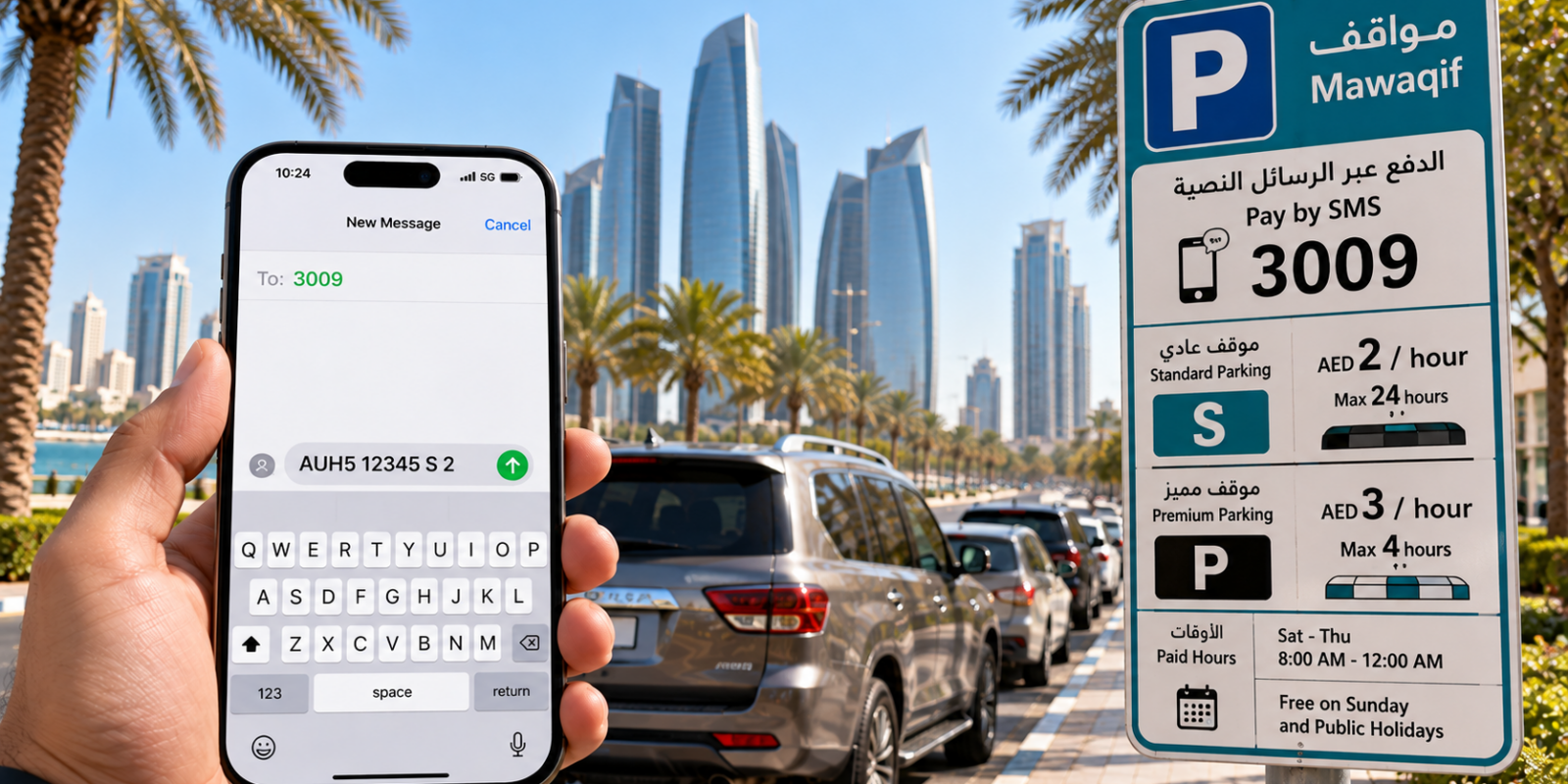
Abu Dhabi parking SMS lets you pay for public street parking through your mobile account. As of October 2026, send a message such as AUH5 12345 S 2 to 3009, the number confirmed by Q Mobility’s Mawaqif FAQ. Check your plate prefix and parking type, then wait for successful confirmation.
To pay for Abu Dhabi parking by SMS, use the Mawaqif format shown in this guide. Enter your vehicle details and parking duration in the order shown, send the message to the number listed here, and check the reply to confirm the request. The steps and examples below show what to enter.
Key facts
- SMS format: [plate emirate/category] [plate number] [S or P] [hours], with a space between each field.
- As of October 2026, the SMS payment number is 3009, according to Q Mobility’s current parking FAQ.
- Payment steps: check the bay and your registration details, compose and send the message, then wait for successful confirmation and check the plate, parking type and session details.
- As of October 2026, Standard parking costs AED 2 per hour, with an AED 15 cap for 24 hours, according to Abu Dhabi Mobility’s public-parking rates.
- As of October 2026, Premium parking costs AED 3 per hour and allows a maximum stay of 4 hours, according to Abu Dhabi Mobility’s Premium parking rules.
- As of October 2026, surface parking is chargeable Monday–Saturday, 8:00 a.m.–midnight, and free on Sundays and public holidays, according to Q Mobility’s surface-parking timetable.
How do you pay using Abu Dhabi parking SMS?
Identify your parking type, enter your registered plate details, and send the completed message. Then check the successful confirmation before leaving your vehicle.
MAWAQiF is Abu Dhabi’s public-parking system. Abu Dhabi Mobility is the public-facing name associated with the Integrated Transport Centre (ITC), part of the Department of Municipalities and Transport (DMT). Meanwhile, Q Mobility publishes current Mawaqif customer information and service guidance.
- Read the roadside sign to identify Standard or Premium parking and any restrictions.
- Copy your plate’s emirate, category and registration number from your vehicle registration.
- Compose the message using [plate emirate/category] [plate number] [S or P] [hours], with a space between each field.
- As of October 2026, send the completed message to 3009, confirmed by Q Mobility’s SMS payment guidance.
- Wait for successful confirmation and check the plate, parking type and session details.
The sign next to the bay is the final word. Paying for a session does not override residential restrictions or make an otherwise restricted bay available.
What is the Mawaqif SMS format?
The Mawaqif SMS format contains your plate prefix, plate number, parking type and duration, separated by spaces. Importantly, the first field identifies your vehicle’s emirate and category, not a parking-zone number.
Use this structure: [plate emirate/category] [plate number] [S or P] [hours]. The parking-type letter is separate from your plate category.
As of October 2026, the worked example AUH5 12345 S 2 means an Abu Dhabi category-5 plate numbered 12345, Standard parking, and a duration of 2 hours; e&’s mParking guidance confirms the message fields but uses a legacy prefix example.
However, the current Q Mobility FAQ does not publish every plate-prefix variation. Treat the example as a demonstration, not a prefix to copy for every vehicle. Follow your registration and roadside instructions rather than guessing.
What do S and P mean, and how much does parking cost?
S means Standard surface parking, while P means Premium surface parking. Choose the letter that matches the bay, not the plate category.
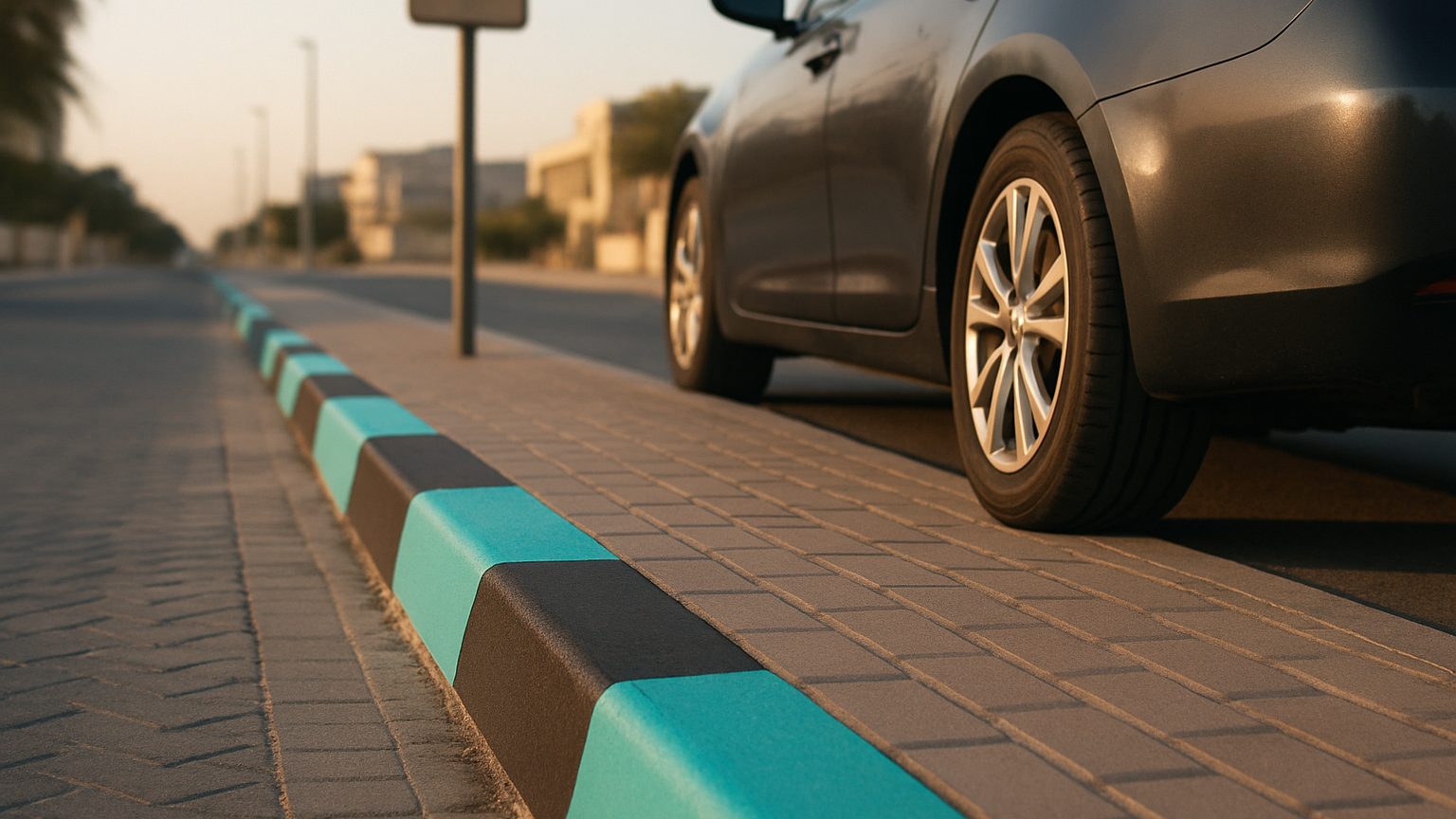
The following Abu Dhabi parking fees and timings are current as of October 2026, using Abu Dhabi Mobility’s official surface-parking schedule.
| Surface parking type | SMS letter | Kerb marking | Rate and maximum stay, as of October 2026 |
|---|---|---|---|
| Standard | S | Black and turquoise | As of October 2026: AED 2/hour; AED 15 cap for 24 hours; maximum stay 24 hours — official Standard tariff |
| Premium | P | White and turquoise | As of October 2026: AED 3/hour; maximum stay 4 hours — official Premium tariff |
There is a terminology difference between official pages. Abu Dhabi Mobility says “turquoise”, while Q Mobility’s FAQ says “blue”. Therefore, use colour as a visual clue rather than your only check.
Also, the published Standard daily cap does not explain every SMS charging scenario. Check the amount and session details in your confirmation instead of assuming how a particular message applies the cap.
What time is Mawaqif parking free in Abu Dhabi?
Public surface parking is free on Sundays and public holidays. Outside the published charging hours, the normal surface-parking tariff does not apply, but bay restrictions still matter.
As of October 2026, Q Mobility’s current FAQ gives normal paid hours as Monday–Saturday, 8:00 a.m.–midnight, with Sundays and public holidays free.
However, special announcements can change the timetable, including during Ramadan. Rules change, so check current authority notices rather than relying on an old seasonal schedule.
These free periods apply to public surface parking. Do not assume that a garage, mall or reserved residential bay follows the same rules.
Can you pay with a Dubai or Sharjah plate?
Mawaqif SMS supports UAE-registered vehicles beyond Abu Dhabi. However, the emirate/category prefix changes with your vehicle’s registration.
If you need Abu Dhabi parking SMS for Dubai plate registration, use the Dubai plate prefix, not the Abu Dhabi prefix in the worked example. The parking-type field still describes the Abu Dhabi bay where you park.
Similarly, a Sharjah registration needs its own plate details. Avoid copying another driver’s message, even when you park beside them.
The live official FAQ does not provide an exhaustive prefix table. Therefore, check the local instructions or use a message builder that supports your plate.
What should you do if your SMS is rejected?
A rejected message is not successful payment. If confirmation does not arrive, check the message details and use another supported payment channel when necessary.
- Check that your plate prefix and number match your registration.
- Check the spaces between fields and the Standard or Premium letter.
- Read any rejection message for the stated problem.
- Use Darb or a parking payment machine if you cannot complete SMS payment.
- Keep the successful payment confirmation for your session.
Also, do not assume SMS payment has no additional telecom charge. Your mobile provider may apply charges; check the confirmation and your provider’s terms.
Can tourists use SMS, and does it work in garages?
Tourists should check whether their mobile service supports the parking SMS transaction before relying on it. SMS payment applies to public surface parking, not every parking facility.
For a rental vehicle, use the car’s actual registration details. However, do not assume a foreign SIM or roaming service can complete the payment simply because it can send messages.
Q Mobility states that SMS is unavailable for multi-storey parking facilities and malls using its Free Flow system. Instead, follow the facility’s own payment instructions.
| Payment method | Practical use |
|---|---|
| SMS | Public surface parking; requires correct plate and parking-type details |
| Darb app | An official alternative listed in current Mawaqif guidance |
| Parking meter or payment machine | An alternative where a suitable machine is available |
How do you extend or check your parking ticket?
Check your confirmation for the session’s expiry and arrange any extension before the ticket expires. Do not assume a particular reply command works universally.
Q Mobility advises drivers to extend before expiry, but its current FAQ does not publish a universal extension SMS command. Therefore, follow the instructions attached to your session or use an official payment channel.
Also, any extension must respect the bay’s maximum stay. If you cannot verify your session, do not treat a sent message alone as proof of successful payment.
Where can UAE Parking help?
UAE Parking builds the parking SMS for you, reducing mistakes in the message format. Its Abu Dhabi parking SMS builder works in your browser and lists city rates and operating hours.
The free iPhone and Android app lets you save plates and select one when parking. Plates stay on your device only.
However, UAE Parking is independent and is not affiliated with Abu Dhabi Mobility or Q Mobility. The parking operator charges your mobile account when you send the SMS; UAE Parking does not take or process payments.
If you are driving to Dubai instead, use our instructions for paying for Dubai parking with an Abu Dhabi plate rather than the Abu Dhabi payment format.
Frequently asked questions
What number do I text for Abu Dhabi parking?
As of October 2026, text your parking message to 3009, according to Q Mobility’s current FAQ. Wait for successful confirmation before treating the session as paid.
What does S mean in an Abu Dhabi parking SMS?
S means Standard surface parking; P means Premium surface parking. These letters describe the parking bay, not your vehicle’s plate category.
Is Abu Dhabi parking free on Sundays?
As of October 2026, public surface parking is free on Sundays and public holidays, according to Q Mobility’s current FAQ. However, do not apply that rule automatically to multi-storey facilities or restricted bays.
Can I pay for a mall car park using Mawaqif SMS?
Q Mobility says SMS is unavailable for multi-storey facilities and malls using its Free Flow system. Follow the facility’s own payment procedure instead.
What is the Abu Dhabi parking SMS format?
Use [plate emirate/category] [plate number] [S or P] [hours], with spaces between the fields. S means Standard parking and P means Premium parking. The example AUH5 12345 S 2 represents an Abu Dhabi category-5 plate numbered 12345, Standard parking and 2 hours; use your own vehicle’s registration details rather than copying the example prefix.
How can I check that my SMS payment went through?
Wait for a successful confirmation reply, then check the plate, parking type, amount and session details, including expiry. Keep the confirmation for your session. A sent message alone is not proof of payment; if confirmation does not arrive, check your message details and use Darb or a parking payment machine if necessary.
Bottom line
Check the bay, enter your registered plate details, choose Standard or Premium, and wait for successful confirmation. For help composing the message, download the free UAE Parking app for iPhone or Android; payment still goes through the parking operator.